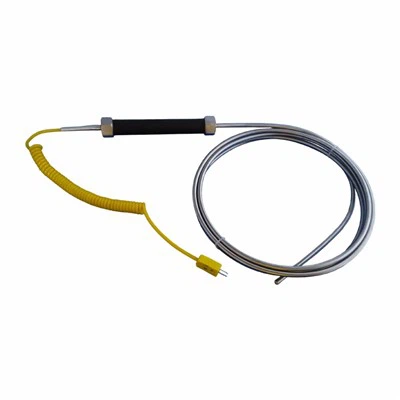
Hey there! As a magnetic thermocouple supplier, I get a lot of questions about how to connect these nifty devices to a data acquisition system. It might seem a bit tricky at first, but with the right steps, you'll have it up and running in no time. So, let's dive right in!
Understanding the Basics
First off, let's talk about what a magnetic thermocouple is. It's a type of temperature sensor that uses the Seebeck effect to measure temperature. The magnetic part comes in handy as it allows for easy attachment to metal surfaces, making it super convenient for various applications.
Now, a data acquisition system (DAQ) is like the brain that collects and processes the data from the thermocouple. It can display the temperature readings, store the data for later analysis, and even send alerts if the temperature goes out of a certain range.
Gathering the Necessary Tools
Before you start connecting your magnetic thermocouple to the DAQ, you'll need a few tools. You'll need a screwdriver (usually a small Phillips or flathead, depending on your DAQ), some wire strippers, and possibly some electrical tape. Make sure you have everything within reach before you begin.
Step 1: Prepare the Thermocouple
The first thing you need to do is prepare the magnetic thermocouple. Check the wires of the thermocouple. Most thermocouples have two wires - a positive and a negative. You can usually tell them apart by their color. Different types of thermocouples have different color - coding standards. For example, in a type K thermocouple, the positive wire is usually yellow and the negative is red.
If the wires are too long, you can use the wire strippers to trim them to a more manageable length. Just make sure you don't cut them too short, as you'll need enough length to connect to the DAQ.


Step 2: Identify the Input Channels on the DAQ
Next, you need to find the input channels on your data acquisition system. These are the ports where you'll connect the thermocouple wires. The DAQ should have a manual that tells you which channels are for thermocouples. Some DAQs have specific channels labeled for different types of thermocouples.
Step 3: Connect the Thermocouple Wires
Once you've identified the input channels, it's time to connect the thermocouple wires. First, strip about 1/4 to 1/2 inch of insulation from the ends of the thermocouple wires using the wire strippers. Then, carefully insert the stripped ends of the wires into the appropriate input channels on the DAQ.
Most DAQs have screw - terminals for the connections. Use the screwdriver to loosen the screws on the terminals, insert the wires, and then tighten the screws to secure the connection. Make sure the connection is tight to prevent any loose connections that could cause inaccurate readings.
Step 4: Configure the DAQ
After connecting the thermocouple, you need to configure the DAQ to recognize the thermocouple. This usually involves setting the type of thermocouple (e.g., type K, type J, etc.) in the DAQ's software. You'll also need to set the appropriate range for the temperature readings.
Open the DAQ software on your computer. Navigate to the sensor configuration section and select the type of thermocouple you're using. Then, set the temperature range based on the expected temperatures you'll be measuring.
Step 5: Test the Connection
Once you've configured the DAQ, it's time to test the connection. Turn on the DAQ and the software. You should start seeing temperature readings on the screen. If you don't see any readings or if the readings seem incorrect, double - check your connections. Make sure the wires are properly inserted and tightened in the terminals.
If the problem persists, there could be an issue with the thermocouple itself. You can try testing the thermocouple using a multimeter to see if it's functioning properly.
Different Types of Thermocouples
We offer a variety of thermocouples, including Armored Thermocouple, Surface Thermocouple, and Tungsten - rhenium Thermocouple. Each type has its own unique features and applications.
Armored thermocouples are great for harsh environments as they are protected by a metal sheath. Surface thermocouples are designed to measure the temperature of surfaces, and tungsten - rhenium thermocouples are used for high - temperature applications.
Troubleshooting Tips
If you're having trouble getting accurate readings, here are some things to check:
- Loose connections: As mentioned earlier, make sure all the connections are tight. A loose connection can cause fluctuations in the readings.
- Incorrect thermocouple type: Double - check that you've selected the correct thermocouple type in the DAQ software. Using the wrong type can lead to inaccurate readings.
- Environmental factors: Extreme temperatures, electromagnetic interference, or moisture can affect the performance of the thermocouple. Try to place the thermocouple in a stable environment.
Conclusion
Connecting a magnetic thermocouple to a data acquisition system isn't as complicated as it might seem. By following these steps, you can ensure a proper connection and accurate temperature readings. If you have any questions or need more information about our magnetic thermocouples or other types of thermocouples, feel free to reach out. We're here to help you with all your temperature - sensing needs. Whether you're in the industrial, scientific, or any other field that requires precise temperature measurement, we've got the right thermocouple for you. So, don't hesitate to contact us for more details and to discuss your specific requirements. We look forward to working with you!
References
- "Thermocouple Handbook: Theory and Practice" by Omega Engineering
- User manuals of various data acquisition systems